ISO 9001, ISO 14001, ISO 45001, and IECQ QC080000
 Over 15 Years of Expertise
 FREE samples provided to ensure product satisfaction
 Rapid Turnaround: Mass Production Complete in 15 - 20 Days
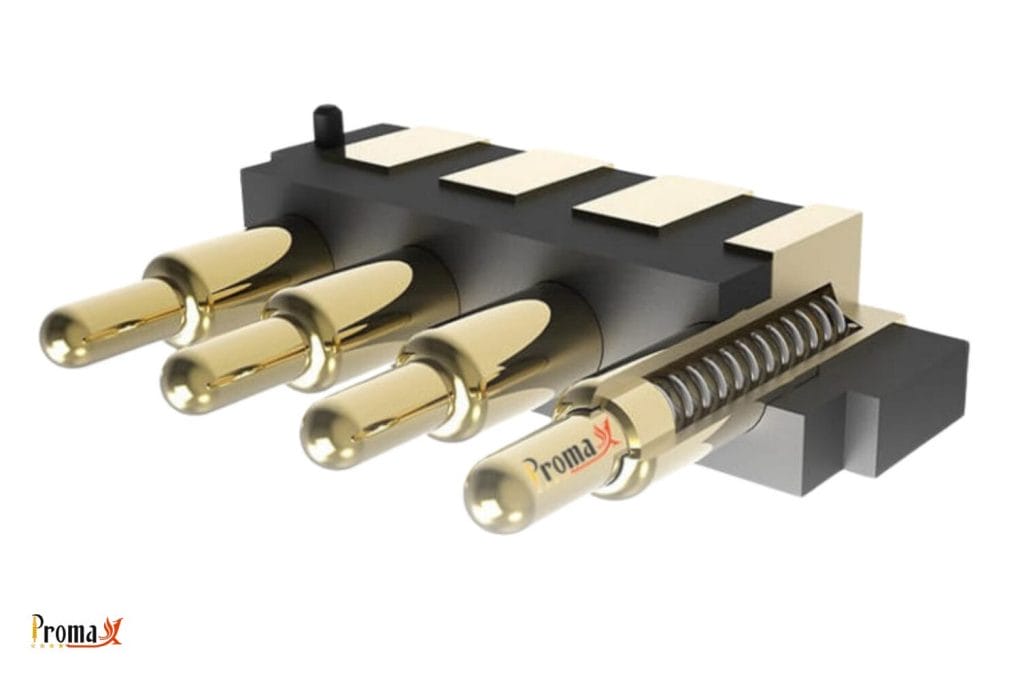
Pogo pins connect your electronic devices and testing equipment. These spring-loaded connectors work like tiny bouncing metal sticks that help electricity flow through the circuit. Even the best Promax pogo pins from our pogo pin factory get dirty over time. Dust, oil, and other residue build up and stop them from working right.
Cleaning your pogo pin connector regularly helps them last longer and work better. It’s like brushing your teeth – a little maintenance prevents bigger problems later. This guide shows you simple cleaning methods that keep your Promax pogo pins in top shape and protect them from damage. The appropriate cleaning technique can save you from buying new ones too soon.
Key Takeaways
- Regular cleaning stops connection problems and makes pogo pins last longer
- Different types of dirt need different cleaning methods
- Special cleaning pads safely clean pins without damaging the gold surface
- Never use stiff brush or push too hard when cleaning pogo pins
- Always check if pins are truly clean through inspection or by testing them
Why do Your Pogo Pins Need Regular Cleaning?

Pogo pins need regular cleaning because they collect dust, oil, and other substances during normal use in their three small parts: a hollow barrel, a springy plunger, and a tip that makes contact with the test point. Pogo pins are spring-loaded connectors that bounce back when pressed, creating reliable electrical connections in your devices.
Dirt on your pins blocks electricity from flowing properly through the load. Even a tiny, invisible layer of contamination can cause failed tests, spotty connections, or complete signal loss. Some types of dirt can also cause corrosion, permanently damaging the metal parts of your pins. Promax offers a range of options including the solder cup pogo pin for applications requiring robust connections.
Cleaning removes harmful substances before they cause problems. Clean pins deliver reliable performance, accurate test results, and last much longer than dirty ones – saving you time and money on replacements.
What Dirt and Residues Harm Your Pogo Pins?

Dust, sticky flux, and tiny particles are the most common enemies of pogo pins in everyday use. These microscopic bits settle on contact surfaces and physically block good electrical connections. They can also scratch the pin surface during normal operation, causing permanent deformation over time.
Sticky flux residue from soldering creates deposits that attract more dirt and block electricity flow. This stubborn substance is particularly troublesome because it’s hard to see but causes random connection problems that are difficult to track down (such as our SMT/SMD pogo pin which requires precise cleaning for optimal performance).
Other harmful contaminants include:
- Oxidation and corrosion — naturally forms on metal exposed to air
- Oils and grease — create invisible barriers to electrical contact
- Solder splashes — form solid barriers that block connections
Common Contaminants and Their Effects
| Contaminant | Source | Effect on Pins |
|---|---|---|
| Dust/Particles | Environment | Blocks contact, causes scratching |
| Flux Residue | Soldering processes | Creates sticky deposits, attracts more dirt |
| Oxidation | Air exposure | Forms resistance layer, degrades signal |
| Oils/Grease | Handling, manufacturing | Creates insulating film |
| Solder Splashes | Assembly processes | Forms physical barriers |
Best Ways to Clean Pogo Pins
Clean pads are special tools designed just for pogo pins that safely remove surface dirt without causing damage. These cleaning mats contain precise cleaning materials that wipe away contaminants when pins are pressed against them—just like during normal use. Clean pads help effectively remove dirt from the socket and fixture surfaces.
Ultrasonic cleaner provides deeper cleaning by placing pins in a cleaning solution while sound waves create tiny bubbles that knock loose stuck-on residues. This cleaning method works especially well for removing flux residue from hard-to-reach areas. For best results:
- Use 20–30 minutes of ultrasonic cleaning at room temperature (about 25 °C)
- Follow with thorough drying to ensure pins are completely dry
- If using alcohol-based solutions, maintain proper temperature during drying
Anti-static brushes offer targeted cleaning for visible contamination. Always choose ESD-safe brushes with soft bristles (horsehair or nylon) to prevent static charge and scratching. Wire brushes should never be used as they can damage the delicate pin surface. For through hole pogo pin assemblies, extra care is needed around the mounting area.
Cleaning Tool Comparison
| Cleaning Method | Best For | Advantages | Limitations |
|---|---|---|---|
| Clean Pads | Regular maintenance | Safe for gold plating, easy to use | Surface cleaning only |
| Ultrasonic Cleaning | Deep contamination | Reaches hidden areas, removes stubborn residues | Requires specialized equipment |
| Anti-static Brushes | Visible particles | Targeted cleaning, inexpensive | Manual process, limited effectiveness |
| Compressed Air | Loose particles | No contact required, prevents pushing debris deeper | Ineffective for sticky residues |
Need pogo pins fast? Talk to an engineer
Get a custom quote, spec matching, and manufacturing guidance—without slowing down your project.
- ISO 9001 / 14001 / 45001 + IECQ QC080000
- 15+ years of expertise
- Free samples
- Mass production in 15–20 days
How to Remove Different Types of Dirt
There are tons of different kinds of dirt that can get in your pogo pins, which can cause issues down the line. The best removal methods are getting rid of dust and loose particles, handling flux residue with a special cleaner, and fighting oxidation and corrosion with chemical cleaners. Many replacements happen because people don’t know how to properly maintain them.
Removing Dust and Loose Particles
Remove dust using oil-free compressed air at low pressure (under 2 bar). Hold the spray nozzle at an angle about 4 inches from the pins and use short bursts rather than continuous flow. This gentle approach dislodges particles without forcing them deeper into pin mechanisms. For right angle pogo pin configurations, pay special attention to the bend area where particles can accumulate.
Tackling Flux Residue
Clean flux residue with specialized electronic cleaner that dissolves sticky deposits without causing damage. Apply the cleaner sparingly using a lint-free cloth, allowing brief contact before you gently wipe the surface. Always follow with high-purity alcohol (99%+ isopropyl) to remove any remaining cleaner.
Fighting Oxidation and Corrosion
Treat oxidation with contact cleaners specifically designed for electronic connections. Chemical cleaners like DeoxIT work well for removing oxide layers without harming gold plating. Apply using a precision applicator, allow the specified contact time, then gently wipe with a lint-free cloth to reduce any residual chemical.
How Often Should You Clean Your Pogo Pins?
For factory and production environments, clean pogo pins weekly. If your pins are in testing labs and development settings, you should clean them bi-weekly. Clean your pogo pins before and after every single use in field environments.
Factory and Production Environments
Clean pogo pins daily to weekly in production settings based on testing volume and environment. Facilities doing thousands of tests daily should:
- Perform quick cleaning with clean pads daily
- Schedule thorough ultrasonic cleaning weekly
- Replace clean pads after approximately 150 cleaning cycles
Testing Labs and Development Settings
Clean probe and test probes in labs after every 500-1000 test cycles or bi-weekly. These controlled environments collect less dirt, but regular cleaning still ensures consistent results. Create a cleaning log to track maintenance and adjust frequency based on performance. Quality control procedures should depend on proper pin maintenance.
Field Service Applications
Clean pogo pins before and after each use in field environments. Carry portable cleaning kits including:
- Compressed air canisters
- Clean pads
- Alcohol wipes
- Anti-static brushes
How do You Know Your Pins are Really Clean?
Visual inspection confirms cleaning success by examining pins under magnification. Use a 10x magnifier or microscope to check pin surfaces for remaining contaminants. Focus especially on:
- Pin tips where contact occurs
- Junctions between pin parts
- Spring mechanism openings
Electrical testing verifies function by measuring contact resistance before and after cleaning. Clean gold-plated pogo pins should show resistance readings in the milliohm range, with consistent values across multiple tests of electrical connections.
Mechanical testing checks function by testing spring action. Clean pins should:
- Move smoothly through their entire range
- Return completely when released
- Maintain consistent pressure when under load
Get the Most From Your Promax Pogo Pins
Keep your valuable Promax pogo pins working perfectly with regular, proper cleaning. Choose the right cleaning method based on your specific contamination issues, and follow a consistent maintenance schedule. Remember that preventing dirt through proper handling is just as important as cleaning, to stick with a reliable testing process. For specialized applications, consider our double ended pogo pin which offers enhanced connectivity options.
Need help finding the best cleaning approach for your application? Contact Promax Pogo Pin’s technical team today for expert recommendations and access to professional-grade cleaning products designed specifically for your pin configuration. Let us help you maximize performance and reduce downtime in your critical operations.
How to Clean Pogo Pins FAQs
Can I use WD-40 or similar products to clean pogo pins?
No, never use WD-40 or other commercial lubricants on pogo pins. These products leave behind films that attract dust and block electrical contact. They can also damage internal components and special coatings. Always use cleaners made specifically for electronic contacts that evaporate completely without leaving residue. Care should be taken to avoid damage to the sensitive components.
How do I clean pogo pins without taking apart my device?
Clean assembled pogo pin connections using precision cleaning pens with fine tips that reach visible pin surfaces. Apply the cleaner, then connect and disconnect the pins several times to work the solution into the contact area. Let everything dry completely before using the device again. For hard-to-reach pins, try clean pads mounted on thin handles or use appropriate cleaning tools designed for embedded components.
What causes black stuff on pogo pin tips, and how do I fix it?
Black residue on pogo pin tips is usually carbon buildup from tiny electrical sparks or oxidized metal. This happens most often when connections are made while power is flowing. Prevent this by turning off power before connecting or disconnecting. For pins already showing black residue, use detergent specially made for removing carbon deposits from electronic components. A gentle but thorough cleaning approach will be needed to remove this stubborn layer.
Back to Top: How to Clean Pogo Pins | Simple Promax Pogo Pin Guide
Need pogo pins fast? Talk to an engineer
Get a custom quote, spec matching, and manufacturing guidance—without slowing down your project.
- ISO 9001 / 14001 / 45001 + IECQ QC080000
- 15+ years of expertise
- Free samples
- Mass production in 15–20 days