ISO 9001, ISO 14001, ISO 45001, and IECQ QC080000
 Over 15 Years of Expertise
 FREE samples provided to ensure product satisfaction
 Rapid Turnaround: Mass Production Complete in 15 - 20 Days

Pogo pin tablets are tablets that use spring-loaded connectors to connect to keyboards, chargers, and docking stations — no cables, no Bluetooth pairing — all through simple magnetic contact. Our team at Promax engineers pogo pins and pogo pin connectors for tablet devices to make your life easier.
Regular USB ports eventually wear out from plugging and unplugging cables over and over. Pogo pins are way more durable and keep working reliably for much longer, which is why global brands like Apple, Microsoft, Samsung, and Lenovo all use them. In this guide, we’ll break down how pogo pins actually work, why they’re such a big deal, and what specs matter if you’re designing modern tablets.
Key Takeaways
- Pogo pins last 100 times longer than USB ports with 1 million connection cycles
- Gold-plate coating between 0.5 to 1.0 microns provides corrosion resistance and extends lifespan
- Contact resistance below 50 milliohms means fast tablet charging and good data transfer
- Better materials like beryllium copper offer superior durability over cheaper options
- Proper testing prevents product issues that happen with untested components
How do Pogo Pins Connect Your Tablet?
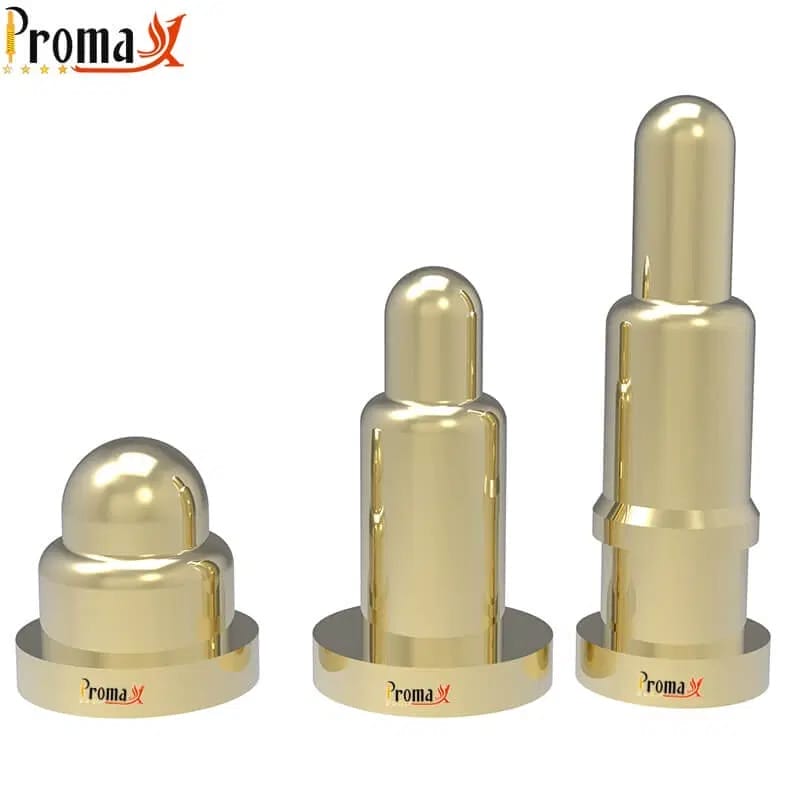
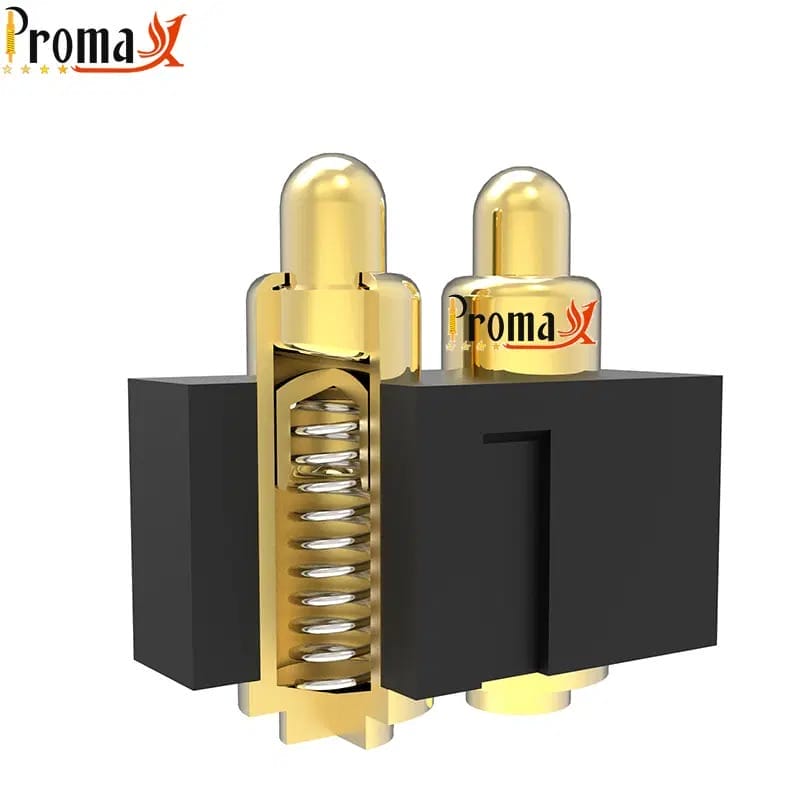
Pogo pins make connections through spring-loaded contact points that press together when your tablet accessory clicks on. The plunger slides into the barrel while the spring pushes with 10 to 60 grams of steady pressure against the contact pad. This spring pressure maintains reliable electrical contact even when your tablet bumps around or shifts slightly.
When you bring your touchscreen device near a magnetic keyboard, magnets pull them together while the pogo pin contacts line up automatically. The spring compresses 1 to 3 millimeters, and electricity flows through the gold surfaces in milliseconds. This layout enables the 1 million connection lifespan that makes pogo pins indispensable in tablet engineering for accessories you use every day (such as our right angle pogo pin).
What Materials Work Best for Tablet Pogo Pins?
Beryllium copper gives the best performance with 20 to 60% of pure copper’s conductivity plus great spring action to resist oxidation. This copper-beryllium mix keeps steady spring pressure through millions of presses while moving electricity fast for quick charging. The material costs 30-40% more but delivers better compactness, mechanical resilience, and longevity.
Material Comparison
| Material | Conductivity | Lifespan | Cost | Best For |
|---|---|---|---|---|
| Beryllium Copper | Excellent | 1M+ cycles | High | Premium tablets, detachable magnetic pogo pin keyboard |
| Phosphor Bronze | Good | 500K cycles | Medium | Android tablet, regular use |
| Stainless Steel | Moderate | 1M+ cycles | Medium | Rugged tablet, industrial or outdoor environments |
Phosphor bronze offers a middle option with decent conductivity for accessories needing 100,000 to 500,000 connections where budget matters. Many latest Android and Lenovo tablets use phosphor bronze successfully. Stainless steel provides maximum toughness and heat resistance for rugged tablets in extreme places.
What Numbers Matter for Tablet Pogo Pins?
Contact resistance below 50 milliohms keeps your tablet charging fast and data moving smoothly without voltage drops. Promax Pogo Pin measures this using four-wire Kelvin testing to check each pin meets standards. Lower resistance means less heat during power delivery, which helps both the connector and your battery last longer.
Critical Specifications

- Spring Force: 20–40 grams balances good contact with surface protection
- Gold Plating: 0.5-1.0 microns determines connection lifespan
- Operating Temperature: -40 °C to 150 °C for harsh environments
- Contact Resistance: ≤50 milliohms for efficient power supply
- Current Capacity: 3–5 amperes per pin for fast charger applications
Gold plating thickness between 0.5-1.0 microns decides how many connections your pogo pins survive before the coating wears through. Thinner 0.5 micron plating handles about 100,000 cycles, good for accessories used a few times daily for 3–5 years. Premium 1.0 micron gold-plate coating reaches the full 1 million cycles needed for heavy daily use. The latest research notes that pogo pins in tablets are made mainly from copper, nickel, and gold. Gold is the best for strong, long-lasting, and reliable electrical connections.
How does Gold Coating Protect Connectors?
Gold plating stops rust and corrosion that would increase electrical resistance and cause connection failures in pogo pin connectors. Unlike copper, silver, or nickel that tarnish when exposed to air and moisture, gold stays stable and conducts consistently. Promax Pogo Pin applies 0.5-1.0 microns of gold through electroplating, which deposits metal atom-by-atom for even coverage across pogo pin arrays.
Nickel under-plating creates a barrier that stops base metal from moving through the gold layer over time. This two-layer approach gives better long-term corrosion resistance, especially in humid places or high temperatures. The nickel also makes the surface harder to resist wear in keyboard Windows and 2 in 1 device applications. Promax offers a range of options including the waterproof magnetic connectors for this application.
Why Tablets Use Pogo Pins Instead of USB
Pogo pins skip the physical wear that destroys USB ports after 10,000 plug-ins by using magnetic attachment and spring contacts instead. Your tablet’s USB port has a thin metal tongue that bends, rusts, and eventually breaks from repeated cable insertion. Pogo technology avoids this completely because nothing inserts, eliminating open ports that create entry points for dust and moisture.
Key Advantages Over USB

- 100x longer lifespan: 1 million vs 10,000 cycles
- Magnetic alignment: No fumbling to find the port
- Thinner design: Flush mount vs 3 mm+ protrusion
- Better sealing: Easier to achieve IP67 water resistance, reducing points for dust and moisture ingress
Magnetic alignment enhances the tablet experience by making connections effortless. When you bring your pogo pin keyboard near your device, magnets pull them together and automatically position the pins for perfect contact. This improves touch screen device usability significantly.
Need pogo pins fast? Talk to an engineer
Get a custom quote, spec matching, and manufacturing guidance—without slowing down your project.
- ISO 9001 / 14001 / 45001 + IECQ QC080000
- 15+ years of expertise
- Free samples
- Mass production in 15–20 days
How Promax Pogo Pin Makes Tablet Connectors
Precision CNC machining creates the plunger and barrel from raw metal rods with ±0.01 millimeter accuracy. This tiny-level precision ensures consistent spring compression and electrical alignment across millions of units. Spring fabrication winds stainless steel wire into coils calibrated for 10-60 gram force.
Electroplating deposits gold onto pins in a controlled chemical bath, where electrical current drives gold atoms onto metal surfaces. The coating grows at a steady rate, allowing precise control of the final 0.5-1.0 micron layer. Every connector gets 100% electrical testing before shipping. These processes ensure compatibility across different tablet platforms, including 10.1-inch Windows tablet devices and various form factors (e.g., a solder cup pogo pin).
Which Pin Configuration does Your Tablet Need?
Two-point connectors provide power and ground for charging-only applications where data transfer isn’t required. This simple configuration costs less and takes up minimal space.
Three-point connectors add a data line to power and ground contacts, enabling both charging and peripheral connectivity between your tablet and accessory. iPad Pro’s Smart Connector uses this three-point design to charge keyboards while transferring key press data. This configuration supports USB 2.0 data speeds (480 Mbps) alongside power delivery.
Configuration Comparison
| Type | Contacts | Functions | Data Speed |
|---|---|---|---|
| 2-Point | Power + Ground | Charging only | None |
| 3-Point | Power + Ground + Data | Charging + communication | USB 2.0 (480 Mbps) |
| Multi-Point (5-8) | Power + Multiple data | Complex docking stations, diagnostics | USB 3.0 (5 Gbps) |
Multipoint arrays with 5 to 8 contacts support complex docking solutions requiring multiple data channels for external displays and USB peripherals. These advanced configurations are often integrated into ports on enterprise tablets, requiring multifunctionality in tablets for professional applications.
What Mounting Types Work for Tablet PCBs?
SMT/SMD Pogo Pin (Surface Mount Technology) pogo pins solder directly onto the tablet’s circuit board surface without requiring drilled holes. This mounting style enables automated assembly using pick-and-place machines and reflow soldering. The SMT layout sits lower profile than through-hole alternatives, saving precious internal space.
Through hole pogo pin insert into drilled holes in the PCB and solder on the opposite side, creating stronger mechanical bonds than SMT. This mounting works better for connectors experiencing high insertion forces. Military and industrial tablets often use through-hole mounting for maximum mechanical strength.
What Makes Connections Fail?
Dirt, lint, and skin oils build up on contact surfaces and block electricity flow, causing spotty connections or complete failure. This causes 60% of field failures in pogo pin applications. Regular cleaning with isopropyl alcohol on a cotton swab removes gunk and restores reliable electrical contact.
Spring fatigue happens when connectors exceed their rated lifespan and the spring loses its push against the contact surface. This shows up as weak magnetic hold, unreliable charging, or spotty data connection. Always specify pins with appropriate cycle ratings for your application. Rust breakthrough occurs when thin gold plating wears through to the base metal, which then corrodes and increases contact resistance.
Get Better Tablet Connections with Promax Pogo Pin
Promax Pogo Pin manufactures precision connectors in China with ISO 9001:2015 certified quality that maintains ±0.01 mm accuracy. Our beryllium copper pins with 1.0 micron gold plating deliver the 1 million cycle lifespan and sub-50 milliohm contact resistance your tablet needs. Every connector gets 100% electrical testing and thermal shock validation from -40 °C to 150 °C before shipping.
We serve tablet manufacturers, accessory designers, and electronics OEMs worldwide with custom pogo pin solutions. Contact us for technical consultation, samples, or documentation to start your project.
Pogo Pin Tablets FAQs
Can pogo pins handle fast charging above 18 watts?
Pogo pins deliver fast charging power exceeding 65 watts when designed with proper conductor size, enough pins, and good heat management. Microsoft’s Surface Connect charges Surface Pro devices at their full 65-watt rate through magnetic pogo pin connections. The design needs multiple parallel pins for power delivery to spread current load, pins rated for 3–5 amps each, and contact resistance below 50 milliohms to minimize heat. Specify 1.0 micron gold minimum for charging above 30 watts because higher current speeds up wear (such as our high current pogo pin connector).
How do you clean tablet pogo pins safely?
Turn off your tablet completely before cleaning to prevent electrical shorts. Dip a cotton swab in 90%+ isopropyl alcohol and gently wipe the contact surfaces in circles to dissolve oils and remove particles, the alcohol dries quickly without leaving residue. Don’t use water-based cleaners that leave mineral deposits or cause rust. For stubborn dirt, use a soft brush with alcohol to knock loose debris. Wait 5 minutes for complete alcohol evaporation before reconnecting power or accessories.
What IP rating can pogo pins achieve for water resistance?
Pogo pins achieve IP67 rating (submersion to 1 meter for 30 minutes) when properly sealed with gaskets around the connector housing. This exceeds USB’s typical IP54 rating because pogo pins mount flush with the tablet surface, making them easier to seal completely. Industrial and rugged tablets use IP67-rated pogo pins for reliable operation in construction sites, warehouses, and outdoor environments where water exposure is common.
Back to Top: What are Pogo Pin Tablets? Your Complete Full Guide
Need pogo pins fast? Talk to an engineer
Get a custom quote, spec matching, and manufacturing guidance—without slowing down your project.
- ISO 9001 / 14001 / 45001 + IECQ QC080000
- 15+ years of expertise
- Free samples
- Mass production in 15–20 days